CASTIE
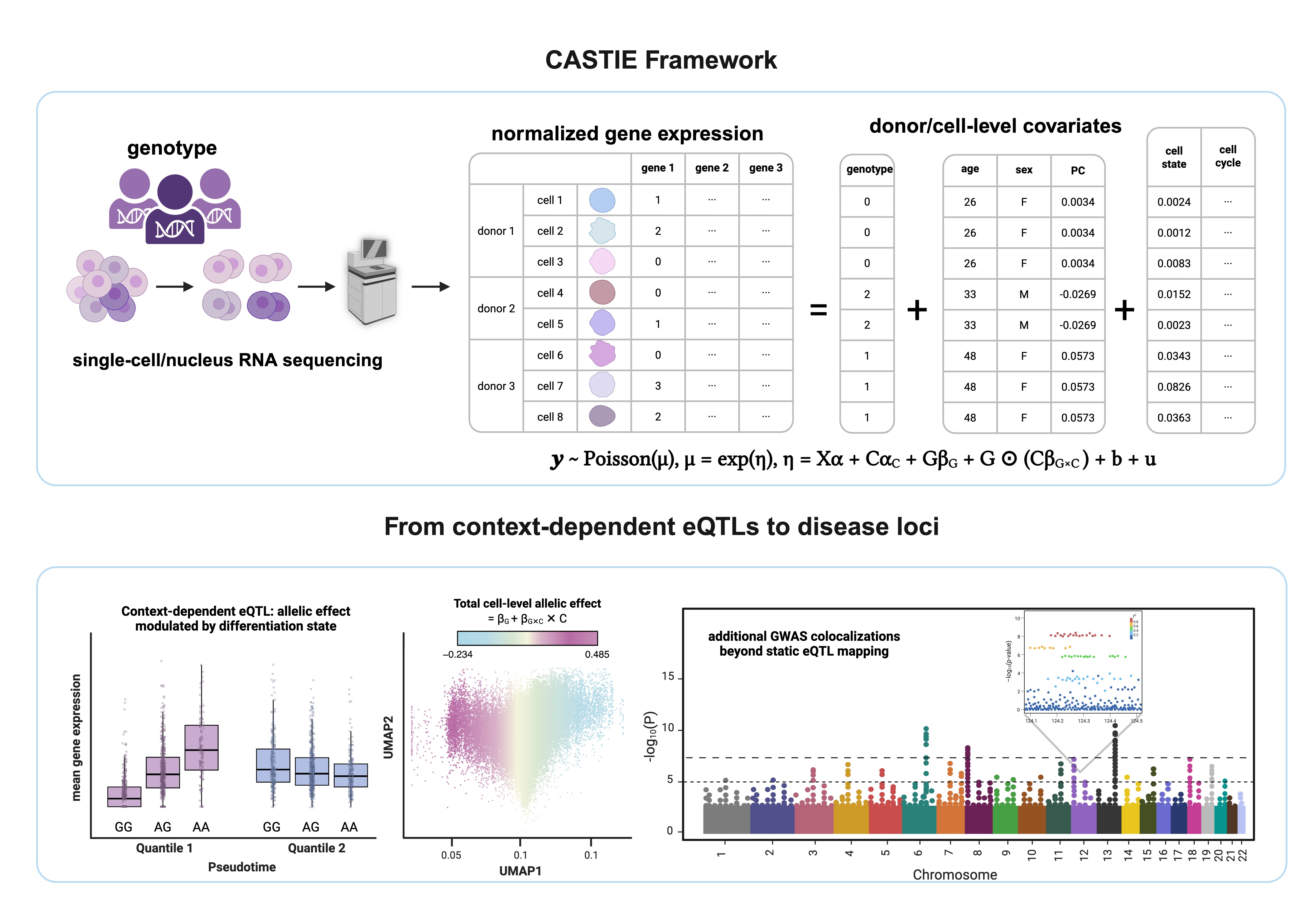
CASTIE (Context-Aware Single-cell Tool for Investigating regulatory Effects) maps context-dependent eQTLs directly from single-cell data without pseudobulk aggregation.
Version updates
Version 0.2.5.9
- Fixed inflation in G×C interaction tests that could occur when both the genotype main effect (beta G) and context main effect (beta C) were large.
Analysis workflow
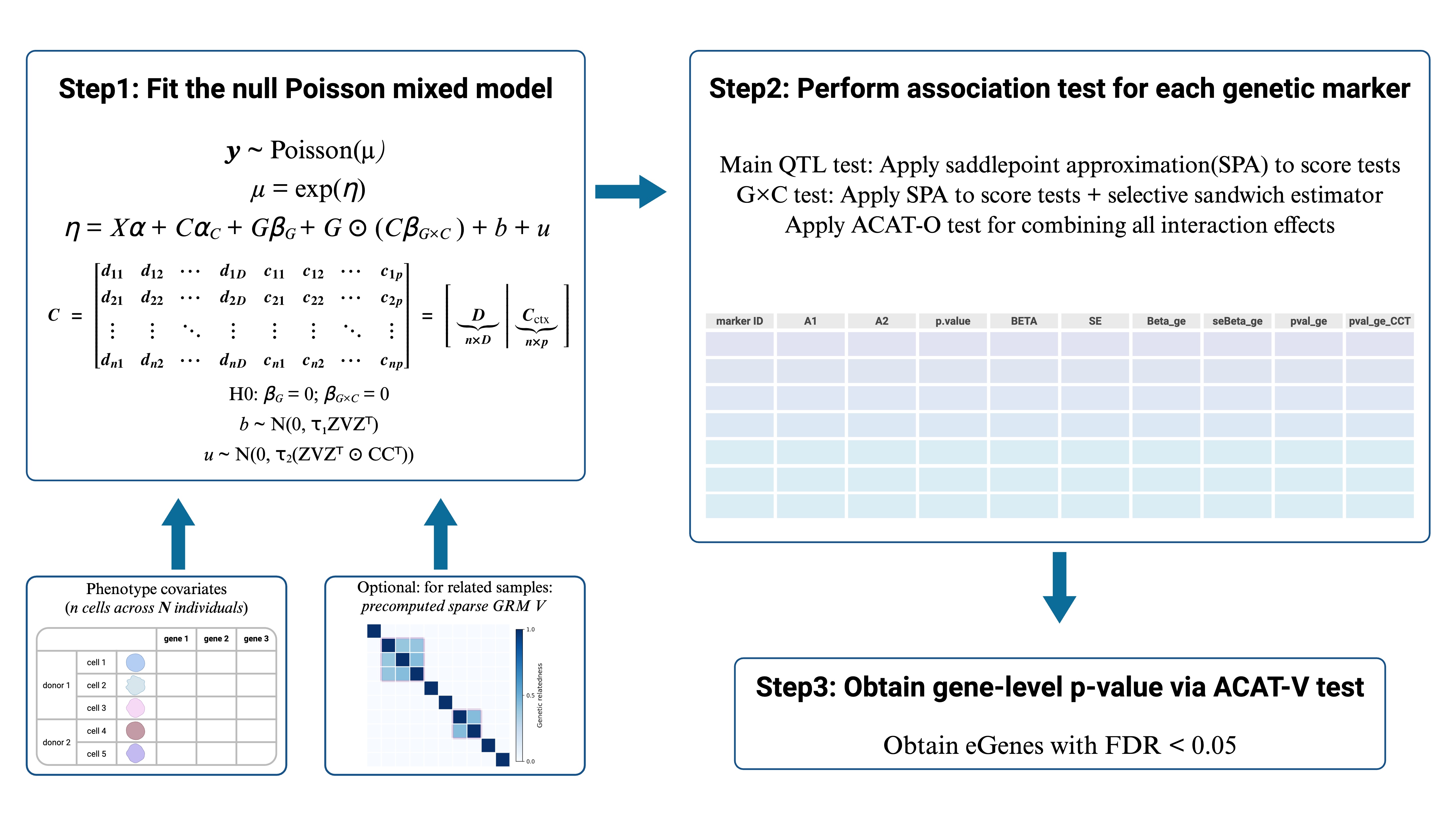
CASTIE has four analysis steps. Step 1 fits the null model, Step 2 performs variant-level association tests, Step 3 combines variant p-values with ACAT, and Step 4 applies FDR control to call eGenes. Because Steps 3 and 4 form the gene-level analysis stage, they are presented together below.
Option A — Docker or Singularity/Apptainer (recommended)
The image contains CASTIE, all dependencies, the command-line scripts, and the simulated tutorial. No source checkout or compilation is required.
Docker
docker login

#Intel/AMD Linux host
docker pull yijia0802/castie:Latest

#Apple Silicon
docker pull --platform linux/amd64 yijia0802/castie:Latest

mkdir -p castie_tutorial_output
Run the entire tutorial at once
docker run --rm --platform linux/amd64 \
  -v "$PWD/castie_tutorial_output:/app/tutorial/output" \
  yijia0802/castie:Latest \
  bash /app/tutorial/run_tutorial_in_container.sh
The completed tutorial results will be available on the host in castie_tutorial_output/.
Singularity or Apptainer
apptainer pull CASTIE.sif docker://yijia0802/castie:Latest
mkdir -p castie_tutorial_output
Use singularity in place of apptainer when that is the command provided by your HPC system.
Run the entire tutorial at once
apptainer exec \
  --bind "$PWD/castie_tutorial_output:/app/tutorial/output" \
  CASTIE.sif \
  bash /app/tutorial/run_tutorial_in_container.sh
The completed tutorial results will be available on the host in castie_tutorial_output/.
Run the Apptainer/Singularity steps separately
Run the tabs in order. Each command uses the tutorial data bundled inside the image and saves its results in the host directory castie_tutorial_output/.
apptainer exec \
  --bind "$PWD/castie_tutorial_output:/app/tutorial/output" \
  --pwd /app/tutorial \
  CASTIE.sif \
  step1_fitNULLGLMM_qtl.R \
    --useSparseGRMtoFitNULL=FALSE \
    --useGRMtoFitNULL=FALSE \
    --phenoFile=data/phenotypes.tsv \
    --phenoCol=gene_1 \
    --covarColList=X1,X2,pf1,pf2 \
    --sampleCovarColList=X1,X2 \
    --dynamicCovarColList=pf1,pf2 \
    --sampleIDColinphenoFile=IND_ID \
    --traitType=count \
    --outputPrefix=output/gene_1 \
    --skipVarianceRatioEstimation=FALSE \
    --isRemoveZerosinPheno=FALSE \
    --isCovariateOffset=FALSE \
    --isCovariateTransform=TRUE \
    --skipModelFitting=FALSE \
    --tol=0.00001 \
    --plinkFile=data/grm_variants \
    --IsOverwriteVarianceRatioFile=TRUE
apptainer exec \
  --bind "$PWD/castie_tutorial_output:/app/tutorial/output" \
  --pwd /app/tutorial \
  CASTIE.sif \
  step2_tests_qtl.R \
    --bedFile=data/genotypes.bed \
    --bimFile=data/genotypes.bim \
    --famFile=data/genotypes.fam \
    --SAIGEOutputFile=output/gene_1_cis \
    --chrom=1 \
    --minMAF=0.05 \
    --minMAC=5 \
    --LOCO=FALSE \
    --GMMATmodelFile=output/gene_1.rda \
    --SPAcutoff=2 \
    --pval_cutoff_for_gxe=1 \
    --varianceRatioFile=output/gene_1.varianceRatio.txt \
    --rangestoIncludeFile=data/gene_1_region.tsv \
    --markers_per_chunk=1000 \
    --output_format=txt
apptainer exec \
  --bind "$PWD/castie_tutorial_output:/app/tutorial/output" \
  --pwd /app/tutorial \
  CASTIE.sif \
  bash -lc '
    concat_step2_results.py \
      --input-dir=output \
      --output=output/step3_input.txt \
      --contexts=pf1,pf2 \
      --file-pattern="*_cis" \
      --gene-regex="^(?P<gene>.+)_cis$" \
      --maf-min=0.05 \
      --maf-max=0.95

    step3_gene_pvalue.R \
      --input=output/step3_input.txt \
      --outdir=output/step3

    step4_get_egenes.R \
      --input=output/step3/step3_longformat.txt \
      --outdir=output/step4 \
      --fdr=0.05
  '
If your system provides singularity, replace the word apptainer with singularity in these commands; all other arguments remain the same.
Docker: run the steps separately
Run the tabs in order. Each Docker invocation uses the tutorial data bundled inside the image and saves its results in castie_tutorial_output/.
docker run --rm --platform linux/amd64 \
  -v "$PWD/castie_tutorial_output:/app/tutorial/output" \
  -w /app/tutorial \
  yijia0802/castie:Latest \
  step1_fitNULLGLMM_qtl.R \
    --useSparseGRMtoFitNULL=FALSE \
    --useGRMtoFitNULL=FALSE \
    --phenoFile=data/phenotypes.tsv \
    --phenoCol=gene_1 \
    --covarColList=X1,X2,pf1,pf2 \
    --sampleCovarColList=X1,X2 \
    --dynamicCovarColList=pf1,pf2 \
    --sampleIDColinphenoFile=IND_ID \
    --traitType=count \
    --outputPrefix=output/gene_1 \
    --skipVarianceRatioEstimation=FALSE \
    --isRemoveZerosinPheno=FALSE \
    --isCovariateOffset=FALSE \
    --isCovariateTransform=TRUE \
    --skipModelFitting=FALSE \
    --tol=0.00001 \
    --plinkFile=data/grm_variants \
    --IsOverwriteVarianceRatioFile=TRUE
docker run --rm --platform linux/amd64 \
  -v "$PWD/castie_tutorial_output:/app/tutorial/output" \
  -w /app/tutorial \
  yijia0802/castie:Latest \
  step2_tests_qtl.R \
    --bedFile=data/genotypes.bed \
    --bimFile=data/genotypes.bim \
    --famFile=data/genotypes.fam \
    --SAIGEOutputFile=output/gene_1_cis \
    --chrom=1 \
    --minMAF=0.05 \
    --minMAC=5 \
    --LOCO=FALSE \
    --GMMATmodelFile=output/gene_1.rda \
    --SPAcutoff=2 \
    --pval_cutoff_for_gxe=1 \
    --varianceRatioFile=output/gene_1.varianceRatio.txt \
    --rangestoIncludeFile=data/gene_1_region.tsv \
    --markers_per_chunk=1000 \
    --output_format=txt
docker run --rm --platform linux/amd64 \
  -v "$PWD/castie_tutorial_output:/app/tutorial/output" \
  -w /app/tutorial \
  yijia0802/castie:Latest \
  bash -lc '
    concat_step2_results.py \
      --input-dir=output \
      --output=output/step3_input.txt \
      --contexts=pf1,pf2 \
      --file-pattern="*_cis" \
      --gene-regex="^(?P<gene>.+)_cis$" \
      --maf-min=0.05 \
      --maf-max=0.95

    step3_gene_pvalue.R \
      --input=output/step3_input.txt \
      --outdir=output/step3

    step4_get_egenes.R \
      --input=output/step3/step3_longformat.txt \
      --outdir=output/step4 \
      --fdr=0.05
  '
Option B — source installation with Pixi (Linux and macOS)
Pixi creates a self-contained environment inside the checkout. Conda, R, a compiler, and administrator access are not required beforehand; Pixi downloads the required tools and dependencies. CASTIE is compiled once during installation.
# Install Pixi once, then reopen the terminal.
curl -fsSL https://pixi.sh/install.sh | sh

# Clone and install CASTIE.
git clone https://github.com/ZhouLabGenetics/CASTIE.git
cd CASTIE
pixi install
pixi run build
pixi run test

# Enter the environment and tutorial directory.
pixi shell
cd tutorial
For non-interactive HPC jobs, use pixi run --manifest-path=/path/to/CASTIE/pixi.toml COMMAND instead of pixi shell.
step1_fitNULLGLMM_qtl.R \
  --useSparseGRMtoFitNULL=FALSE \
  --useGRMtoFitNULL=FALSE \
  --phenoFile=data/phenotypes.tsv \
  --phenoCol=gene_1 \
  --covarColList=X1,X2,pf1,pf2 \
  --sampleCovarColList=X1,X2 \
  --dynamicCovarColList=pf1,pf2 \
  --sampleIDColinphenoFile=IND_ID \
  --traitType=count \
  --outputPrefix=output/gene_1 \
  --skipVarianceRatioEstimation=FALSE \
  --isRemoveZerosinPheno=FALSE \
  --isCovariateOffset=FALSE \
  --isCovariateTransform=TRUE \
  --skipModelFitting=FALSE \
  --tol=0.00001 \
  --plinkFile=data/grm_variants \
  --IsOverwriteVarianceRatioFile=TRUE
step2_tests_qtl.R \
  --bedFile=data/genotypes.bed \
  --bimFile=data/genotypes.bim \
  --famFile=data/genotypes.fam \
  --SAIGEOutputFile=output/gene_1_cis \
  --chrom=1 \
  --minMAF=0 \
  --minMAC=1 \
  --LOCO=FALSE \
  --GMMATmodelFile=output/gene_1.rda \
  --SPAcutoff=2 \
  --pval_cutoff_for_gxe=1 \
  --varianceRatioFile=output/gene_1.varianceRatio.txt \
  --rangestoIncludeFile=data/gene_1_region.tsv \
  --markers_per_chunk=1000 \
  --output_format=txt
concat_step2_results.py \
  --input-dir=output \
  --output=output/step3_input.txt \
  --contexts=pf1,pf2 \
  --file-pattern='*_cis' \
  --gene-regex='^(?P<gene>.+)_cis$' \
  --maf-min=0.05 \
  --maf-max=0.95

step3_gene_pvalue.R \
  --input=output/step3_input.txt \
  --outdir=output/step3

step4_get_egenes.R \
  --input=output/step3/step3_longformat.txt \
  --outdir=output/step4 \
  --fdr=0.05
To run all four tutorial steps automatically from the repository root:
exit  # only if currently inside pixi shell
bash tutorial/run_tutorial_with_pixi.sh
Tutorial results
The final eGene result is written to:
tutorial/output/step4/pval_main_egene.tsv
The simulated tutorial analyzes one gene for software validation. Its q-value equals its p-value; meaningful FDR estimation requires a real multi-gene run.
Support
For questions, contact Christiana Liu at liuyijia@broadinstitute.org or open an issue on GitHub.
Citation
Liu et al., 2026: https://www.medrxiv.org/content/10.64898/2026.08.13.26360300v1